


Beauty Camera - Selfie Sticker
3.77.00 Reviews
App Specs
- Version
- 5.0
- Updated On
- License
- Free
- Downloads
- 1,000,000+
- Developer
- Ghanshyam Sahu
- Categories
- Beauty
- Platform
- Android
Screenshots
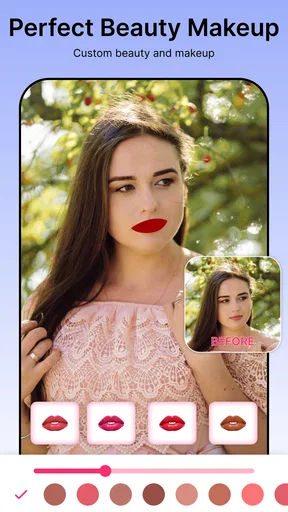
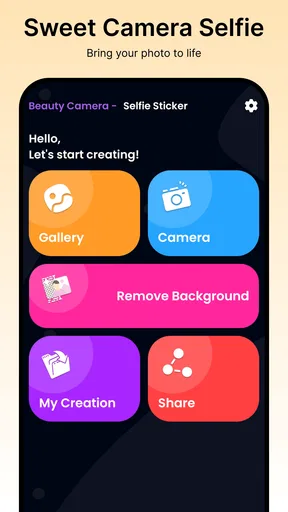
 Analysis by AppCompare
For me, the most useful idea behind Beauty Camera - Selfie Sticker is that it brings a selfie camera and a background remover into the same casual photo workflow. That combination matters less when I want a carefully edited portrait and more when I want a quick picture to feel finished: a filter can set the tone, a sticker can add a playful detail, and removing the background can shift attention away from a distracting room. The app is free, and its focus is straightforward: make a selfie easier to personalize without needing to move between several editing tools.
Why background removal changes the workflow
A background remover is useful when the person in a selfie is fine but the setting is not. Maybe I took a picture near a busy shelf, a cluttered desk, or a plain wall that makes the image feel flat. Being able to separate the subject from that setting gives me another way to shape the photo before sharing it. It is not the same as retaking the picture somewhere more photogenic, but it can help turn an ordinary snapshot into something more deliberate.
I would treat this as a finishing tool rather than a substitute for good light and framing. A clear outline around the subject gives any cutout a better chance of looking convincing; loose hair, a hand near the edge of the frame, or clothing that blends into the background can make separation harder for any automated editor. My practical tip is to take a moment to check the edges before deciding the image is ready. A background change can look striking at a glance while a small rough edge becomes obvious once the picture is viewed full size.
How I would use it in an everyday moment
Imagine I am getting ready to send a new profile picture to a friend, but the best available selfie has a distracting background. I can start with the photo, remove or replace the setting, and then decide whether a filter or sticker improves the result. The sensible order is to settle the composition first, handle the background next, and add decorative effects last. That way, a sticker does not cover an area I still need to inspect, and I can judge whether the finished image feels like me rather than a collection of effects.
This workflow is also handy for a casual invitation, a group chat, or a themed post where a little visual personality is welcome. I would keep the edits lighter for a work profile or a picture meant to look natural. Background removal is most persuasive when the new setting suits the lighting and mood of the original image; putting a bright, polished scene behind a dim selfie can make the cutout feel pasted on. A simple background often looks more believable than one that competes with the face.
Where it sits among selfie editors
Compared with a phone’s built-in camera, a beauty-focused app is appealing when I want filters and visual decoration close to the act of taking or preparing a selfie. Compared with a general photo editor, this app’s draw is its selfie-centered mix of effects and background removal rather than a broad set of controls for every kind of image. That narrower emphasis can save time for quick portraits, although someone who wants detailed layer editing, precise masking, or extensive color correction may be better served by a dedicated editor.
I would also choose a plain camera when the main goal is to preserve an unprocessed image, and a general editor when I need careful control over several parts of a photograph. Beauty Camera makes more sense for the middle ground: a portrait that needs a quick visual lift, with optional decoration and a background adjustment. It is worth asking what I want the finished picture to communicate before adding effects. A clean background may help a profile portrait feel focused; a sticker may suit a friendly message; using both heavily can make the image feel busy.
Worth Reading Before You Choose

EA SPORTS FC Mobile 26 Is a Bigger Football Game, but It Takes Time

Flipboard Shows What News Apps Must Do Beyond the Feed

Switching to Android Auto Means Rethinking Your Driving Routine

Google Calendar Makes a Crowded Week Easier to Manage

Ludo King Makes the Most of the Minutes Between Plans

Baby Panda World Brings Quick Play to Modern Phones, but Its Game Library Feels Busy
Who is likely to get the most from it?
I can see this being a good fit for people who take selfies often, enjoy experimenting with a look, and prefer quick creative edits over a long desktop-style process. It is also approachable for someone who does not want to learn a complicated editor just to make one portrait more cheerful. Ghanshyam Sahu is the developer, and the app is listed for Everyone, which fits its broadly casual subject matter.
It is less suited to anyone who needs a highly realistic retouch for professional work, exact control over every cutout edge, or a reliably consistent editing style across a large batch of images. In those situations, a dedicated portrait or photo editor gives more room to refine details. I would also skip decorative effects when the photo needs to remain documentary or formal. The useful question is not whether an effect is available, but whether it helps this particular image do its job.
Beauty Camera has an average rating of 3.9 from around 822 ratings, and it has passed one million installs. Those figures suggest that it has reached a sizable audience, but they do not tell me whether a particular filter will suit my taste or how a cutout will handle a specific photo. I would judge it with a low-stakes selfie first, then decide whether its style and workflow fit the pictures I actually take.
When it comes to snapping the perfect selfie, there’s no shortage of apps promising to turn your smartphone into a studio. But have you ever tried Beauty Camera - Selfie Sticker? Let me walk you through my experience with this app and why it might just be your new go-to for selfie perfection.
First Impressions and User Interface
Opening up Beauty Camera - Selfie Sticker for the first time, I was greeted with a sleek and intuitive interface. The layout is clean, and it didn’t take long to figure out where everything was. Whether you’re a seasoned selfie-taker or a newbie, you’ll navigate this app like a pro in no time. The design is minimalistic yet stylish, focusing your attention on what really matters—capturing that perfect shot.
Features That Stand Out
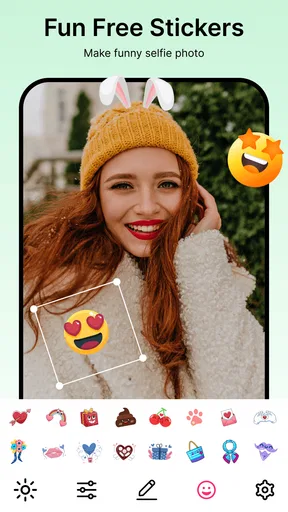
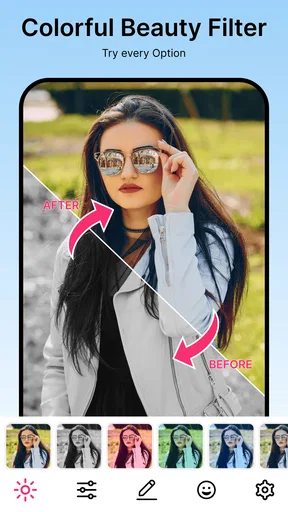
One of the first things I noticed was the vast array of filters and stickers available. The app boasts an impressive collection that can cater to any mood or theme. From playful animal ears to elegant floral crowns, you’ll find something to suit every selfie occasion.
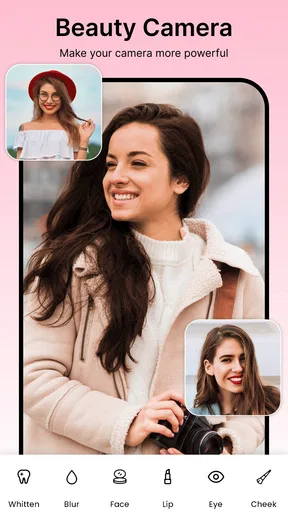
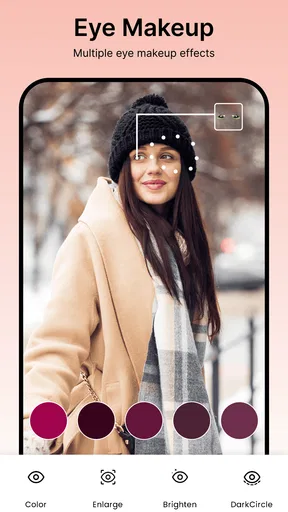
Moreover, the beautification tools are quite comprehensive. You can adjust everything from skin tone to eye size, and even tweak your smile a tad. It’s all about enhancing your natural beauty without going overboard. I found the results to be quite natural, which is a huge plus in my book.
Sticker Fun and More
If you’re a fan of adding a little flair to your selfies, the sticker options in this app are bound to keep you entertained. There are both static and animated stickers, which can add that extra spark to your photos. Ever wanted to see yourself as a cute cartoon character? This app makes it a breeze.
The app also allows you to download more stickers from their online library, keeping your options fresh and exciting. This feature is great for those who love to keep their selfies lively and fun.
Performance and Usability
Performance-wise, Beauty Camera - Selfie Sticker runs smoothly on both Android and iOS devices. I tested it on a mid-range Android phone and didn’t encounter any lag or crashes, even with multiple features running simultaneously. The app is lightweight, ensuring it doesn’t hog all your phone’s memory, which is a relief for those with limited storage space.
Sharing your creations is also a breeze. The app integrates seamlessly with social media platforms, allowing you to post your photos directly to Instagram, Facebook, or wherever your heart desires. The easy sharing functionality is perfect for those who love to keep their followers updated with their latest looks.
Final Thoughts
In a world where selfies are a significant part of our digital expression, having a tool like Beauty Camera - Selfie Sticker can make all the difference. It doesn’t just offer a myriad of features to enhance and personalize your photos; it does so with ease and style.
Whether you’re looking to add some quirky stickers or simply want to refine your look with subtle beauty tools, this app has you covered. It’s fun, functional, and most importantly, it makes taking selfies an even more enjoyable experience. So, if you haven’t already, give it a whirl and see how it transforms your selfie game!
Small choices that make a portrait feel more natural
One useful habit is to compare the edited image with the original before sharing it. I look at the face first, then the outline against the background, and finally the overall color. If a filter changes the mood more than I intended, I would reduce the number of effects rather than add another one to compensate. The point of a beauty camera is not to make every selfie look alike; it is to help me make a particular picture feel finished while keeping the person in it recognizable.
Stickers work best when they have a clear purpose. A small accent can make a casual selfie feel playful, but several competing decorations can draw attention away from the expression. For a photo I plan to use beyond a single message, I would keep a clean version as well as the decorated one. That gives me a more flexible image later, especially if the sticker or background treatment feels too tied to a particular moment.
What to expect before making it part of your routine
The app is free, with a current version of 5.0 and a minimum operating-system requirement of 8.0. That makes the basic decision simple for someone whose device meets that requirement: it can be tried without paying upfront. I would still approach it as a focused selfie tool, not as a replacement for every camera and editor on a phone. Its appeal is strongest when I want to move quickly from a portrait to a more personalized image.
For a first test, I would choose a well-lit selfie with a clearly separated subject, try the background adjustment, and inspect the result around hair and shoulders. Then I would compare a restrained filter with no filter at all. This small test answers the practical questions that matter most: whether the cutout looks acceptable on my photos, whether the available style feels right, and whether I enjoy the workflow enough to keep using it. If those checks do not suit my needs, a standard camera or a more precise editor is the better choice.
Overall, I would recommend Beauty Camera to a friend who wants an easy, playful way to shape selfies, especially when changing the background is more useful than making a full-scale edit. I would not recommend it as the only option for precise portrait retouching or formal images. Used selectively, its mix of selfie effects and background adjustment can save a few steps and give an everyday photo a clearer sense of intent. The best results come from starting with a decent picture, checking the cutout carefully, and stopping when the edit still feels like you.
Pros
- User-friendly interface
- easy to navigate.
- Wide variety of stickers and effects.
- Real-time editing for instant results.
- High-quality photo outputs.
- Regular updates with new features.
Cons
- Ads may interrupt the editing process.
- Some features require in-app purchases.
- Large app size might affect storage.
- Occasional glitches with older devices.
- Limited features in offline mode.
FAQs for Beauty Camera - Selfie Sticker
What features does Beauty Camera - Selfie Sticker offer?
Beauty Camera - Selfie Sticker offers a variety of features including real-time beautification, a wide range of filters, and fun stickers to enhance selfies. The app also provides editing tools like skin smoothing, blemish removal, and face reshaping to help users achieve their desired look. It supports both photo and video modes.
Is Beauty Camera - Selfie Sticker free to use?
Yes, Beauty Camera - Selfie Sticker is free to download and use. However, it offers in-app purchases for premium features and additional content like exclusive filters and sticker packs. Users can enjoy the basic functionalities without any cost, but for an enhanced experience, premium options are available.
How user-friendly is the interface of Beauty Camera - Selfie Sticker?
The interface of Beauty Camera - Selfie Sticker is designed to be intuitive and user-friendly, making it easy for users of all ages to navigate. Clear icons and straightforward menus ensure that even beginners can quickly access and apply filters, stickers, and other editing tools without any hassle.
Does Beauty Camera - Selfie Sticker protect user privacy?
Beauty Camera - Selfie Sticker prioritizes user privacy by implementing security measures to protect personal data. The app requests necessary permissions for camera and storage access, but users should review the privacy policy to understand how their data is handled. Always ensure app permissions align with your comfort level.
Can I share my edited photos directly from Beauty Camera - Selfie Sticker?
Yes, Beauty Camera - Selfie Sticker allows you to share your edited photos and videos directly to social media platforms like Instagram, Facebook, and Twitter. The app provides easy sharing options so you can showcase your creativity with friends and followers in just a few taps.


